Showing posts with label Lambda function. Show all posts

Monday, 24 May 2021

Downloadable Python Paramiko Lambda Layer


Download pre-build Python Lambda Layer deployment package of Paramiko compatible for 2.7 and later runtime. 


You can also create your own deployment package with the help of the below articles.


Here are some other posts that might be helpful :


Downloadable Python XMLSchema Lambda Layer


Download pre-build Python Lambda Layer deployment package of XMLSchema compatible for 3.6 and later runtime. 


You can also create your own deployment package with the help of the below articles.


Here are some other posts that might be helpful :


Downloadable Python Gnupg Lambda Layer


Download pre-build Python Lambda Layer deployment package of Gnupg compatible for 2.7 and later runtime. 


You can also create your own deployment package with the help of the below articles.


Here are some other posts that might be helpful :


Downloadable Python Snowflake Lambda Layer


Download pre-build Python Lambda Layer deployment package of Snowflake compatible for 3.6 and later runtime. 


You can also create your own deployment package with the help of the below articles.


Here are some other posts that might be helpful :


Downloadable Python Fuzzywuzzy Lambda Layer


Download pre-build Python Lambda Layer deployment package of Fuzzywuzzy compatible for 3.6 and later runtime. 


You can also create your own deployment package with the help of the below articles.


Here are some other posts that might be helpful :


Downloadable Python Levenstein Lambda Layer


Download pre-build Python Lambda Layer deployment package of Levenstein compatible for 3.6 and later runtime. 


You can also create your own deployment package with the help of the below articles.


Here are some other posts that might be helpful :


Wednesday, 19 May 2021

Downloadable Python Requests Lambda Layer


Download pre-build Python Lambda Layer deployment package of Requests compatible for 3.6 and above runtime. 


You can also create your own deployment package with the help of the below articles.


Here are some other posts that might be helpful :


Downloadable Python Pandas Lambda Layer


Download pre-build Python Lambda Layer deployment package of Pandas compatible for 3.6 and above runtime. 


You can also create your own deployment package with the help of the below articles.


Here are some other posts that might be helpful :


Tuesday, 11 May 2021

Creating And Using Lambda Layer in AWS Lambda

You can find how to create a lambda function using EC2 here. Once the deployment package is created and placed in S3 in the bucket.

STEPS TO CREATE LAMBDA LAYER:

Below are the steps to create a lambda layer in AWS.

1) Navigate to Lamdba and choose Layers from Dashboard.

Lambda Layer
Lambda Layer

2) Choose create the layer, mention the layer name, description, Runtimes and select “Upload a file from Amazon S3” and click create. You can also upload the zip file directly from the remote, but the zip file size should be less than 10 MB.

Options to upload Zip file

3) Click create and copy the ARN of the lambda layer. You can create another version by 'CREATE VERSION' at the top right corner of the Lambda Layer page, by following the same steps as above.

Lambda Layer
Lambda Layer


HOW TO USE LAMBDA LAYER IN LAMBDA FUNCTION:

Below are the steps to add the lambda layer in the desired lambda function.

·    1) Go to the desired lambda function. Click on the Layers and choose the “Add a layer” option.

Add a layer - AWS Lambda

2) 
 After that choose “Specify an ARN” option and paste the ARN of the desired lambda layer.

Choose a layer - AWS Lambda

3) 
Click “ADD” and now run the lambda function.

If Below might the error that you may face while using the lambda layer in a function.

    ERROR MESSAGE: No module found

    SOLUTION: Probably because your deployment package doesn't have a proper structure. 

Lambda Layer Structure

   ERROR MESSAGE: Task timed out after 3.00 seconds

    SOLUTION: Increase the timeout period, you can increase it up to 15 mins it is under the configuration tab.

Configuration - AWS Lambda

Monday, 10 May 2021

Creating Lambda Deployment Package Using EC2

Lambda Layers: 

An archive containing additional code, such as libraries, dependencies, or even custom runtimes. When you include a layer in a function, the contents are extracted to the /opt directory in the execution environment.

Run the commands mentioned below to create the package for lambda layers in the EC2 server.

The Lambda Layer you are creating should have the below structure or else will get the error message “No module found” while importing the module in lambda function.
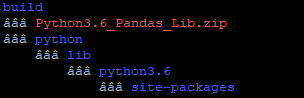
Lambda Layer Structure

STEPS TO CREATE PACKAGE FOR LAMBDA LAYER:

  1. Create a folder structure as below to install the package for desired modules. 

    mkdir -p build/python/lib/python3.6/site-packages
    

  2. Below three commands are to select the python version to install the modules and to install pip3. (Optional) 

    ls usr/bin/python*
    sudo update-alternatives --install /usr/bin/python3 python /usr/bin/python3.6 1
    sudo update-alternatives --config python3
    sudo apt install python3-pip
    

  3. This command is to install the desired module in the targeted folder. Here I am installing Pandas and xlrd.  

    pip3 install pandas xlrd -t build/python/lib/python3.6/site-packages/ --system
    

    Below commands are to create the zip file for the lambda layer package. 
     

    cd build/
    zip -r9 Python3.6_Pandas_Lib.zip *
    

    That's it now the deployment package is ready. Copy the zip file to the S3 bucket.
--------------------------------------------------------------------------------------------------------------
Here are some other posts that might be helpful :

Thursday, 6 May 2021

Copy an Object between AWS Accounts using boto3


MOVE S3 OBJECT BETWEEN AWS ACCOUNTS USING BOTO3

Before moving on to the code, let's go through about the /tmp directory provided by the Lambda function.

Temporary storage with /tmp

  • The lambda function execution environment provides a file system for the code to use at /tmp.
  • On each new execution environment is created.
  • It is important to know /tmp is not recreated or cleared on each lambda invocation.
  • And it is okay/safe to use /tmp in Lambda since this folder is not shared with other AWS clients.

Here I have taken a scenario to copy an S3 object from PROD to DEV using boto3 in a lambda function.

import boto3

# AWS credentials of PROD environemnt
s3 = boto3.client('s3',aws_access_key_id='awsAccessKey',
aws_secret_access_key='awsSecretAccessKey')

# AWS credentials of DEV environemnt
s3Dev = boto3.client('s3',aws_access_key_id='awsAccessKeyDev',
aws_secret_access_key=awsSecretAccessKeyDev)

def lambda_handler(event, context):

#Downloads the file from PROD S3 bucket and saves in temporary storage
    s3.download_file('source_bucket', 'folder/source.csv', '/tmp/source.csv')

    print('File Downloaded')

    file = '/tmp//source.csv'

#Uploads the file in temporary space to DEV S3 bucket 
    s3Dev.upload_file(file , 'target_bucket','folder/target.csv')

    print('File Uploaded')

    return {
         'statusCode': 200
    }


Here are some other posts that might be helpful :

Convert Nested JSON to CSV using Python in S3