Showing posts with label snowflake. Show all posts

Wednesday, 2 June 2021

SQL | Snowflake | IFNULL vs NULLIF function


 DIFFERENCE BETWEEN IFNULL AND NULLIF FUNCTION


These SQL functions are compatible with mysql, SQL Server, Power BI, Big query.


IFNULL FUNCTION: If the in-parameter is NULL then it returns the default out-parameter.


Syntax : IFNULL (<in-parameter>,<out-parameter>)

SQL Snowflake IFNULL( ) function


NULLIF FUNCTION: If the first in-parameter is equal/same to the second in-parameter it returns NULL. If the first in-parameter is not equal/same to the second in-parameter it returns the first in-parameter.

Syntax : NULLIF (<in-parameter-1>,<in-parameter-2>)

SQLSnowflake NULLIF ( ) function


IFNULL( ) VS NULLIF( ) FUNCTION:


Features

IFNULL

NULLIF

Syntax

IFNULL (<in-parameter>,
<out-parameter>)

NULLIF (<in-parameter-1>,
<in-parameter-2>)

Example

[1] IFNULL(NULL,28)

[2] IFNULL(100, 28)

[1] NULLIF(28,28)
[2] NULLIF(100,28)

Number of
IN parameter

1

2

Number of
OUT parameter

1

0

If IN parameter is NULL

Returns out-parameter value
O/p : [1] Returns 28

NA

If IN parameter is NOT NULL

Returns in-parameter value
O/p : [2] Returns 100

NA

If IN parameter 1 is same/equal to IN parameter 2

NA

Returns NULL
O/p :[1] Returns NULL

If IN parameter 1 is not same/equal to IN parameter 2

NA

Returns in-parameter-1
O/p :[2] Returns 100


SQL Snowflake NULLIF vs IFNULL function


Read More :

Monday, 31 May 2021

Snowflake NVL vs NVL2 function | SQL

DIFFERENCE BETWEEN  NVL AND NVL2 FUNCTION


This post explains the difference between NVL and NVL2 functions in Snowflake.

The NVL and NVL2 functions are also compatible with other databases like Teradata, Mysql, Postgresql, Oracle, PLSQL, Amazon Redshift.


NVL FUNCTION


The NVL function will return the default value if the in- parameter is NULL.

Syntax: NVL ( <in-param>,<out-param>)
  • If the in-param is NULL then it will return the out-param value.
  • If the in-param is NOT NULL then it will return the in-param value itself.

Difference between NVL and NVL2 function | Snowflake
Difference between NVL and NVL2 function


NVL2 FUNCTION


The NVL2 function will return the first out-parameter if the in-parameter is NOT NULL and return the second parameter if the in-parameter is NULL.


Syntax: NVL2( <in-param>,<out-param-1>,<out-param-2>)

  • If the in-param is NULL then it will return the out-param-1 value .
  • If the in-param is NOT NULL then it will return the in-param-2 value itself.

Difference between NVL and NVL2 function | Snowflake
Difference between NVL and NVL2 function

NVL VS NVL2 FUNCTION


Features

NVL

NVL2

Syntax

NVL ( <in-param>,<out-param>)

NVL2( <in-param>
,<out-param-1>
,<out-param-2>)

Example

[1] NVL(NULL,'It is NULL')
[2] NVL('99','It is NULL')

[1] NVL2('99','It is Not NULL'
,'It is NULL')

Number of
IN parameter

1

1

Number of
OUT parameter

1

2

If IN parameter is NULL

Returns <out-param>
i.e
[1] 'It is NULL'

Returns <out-param-1>
 i.e
[1] 'It is Not NULL'

If IN parameter is NOT NULL

Returns  <in-param>
 i.e
[2] '99'

Returns <out-param-2>
 i.e
[1] 'It is NULL'


NVL vs NVL2 function | SQL


Read More :

Thursday, 6 May 2021

Part 2 | Snowflake Developer Interview Questions

FREQUENTLY ASKED SNOWFLAKE CLOUD DEVELOPER INTERVIEW QUESTIONS

In continuation of Snowflake Developer Interview Questions and Answers (Part 1).

Topics Covered are Snowflake NVL2 and NVL function, Warehouse, STREAM, External table, types of tables in snowflake, Time travel, Fail-Safe, and materialized view.

Let's jump right away into the question.

Q1: What is Snowflake URL?


Format URL: account.region.snowflakecomputing.com 

Sample URL: blogger.us-east-1.snowflakecomputing.com

Q2: Explain the difference between NVL2 and NVL function?


NVL2: One input parameter and two output parameter 
Syntax : NVL2( <expr1>, <expr2>, <expr3>)
  • If expr1 is not null, it returns expr2
  • If expr1 is null, it returns expr3
NVL:  One input parameter and one output parameter 
Syntax : NVL( <expr1>, <expr2>)
  • If expr1 is not null, it returns expr1 itself
  • If expr1 is null, it returns expr2
NVL2 , NVL query
NVL2 , NVL query

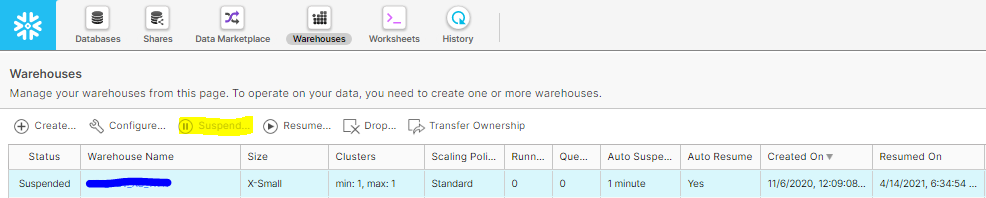
Q3: Is it possible to suspend a warehouse manually?


Yes a warehouse can be suspended manually by two ways.

1) Through GUI, at left corner of the page you can see the Warehouses tab. Navigate to the Warehouses tab, select the warehouse and click on suspend.

Snowflake
Snowflake

2) Second method is through executing query as below.
Syntax:

CREATE OR REPLACE WAREHOUSE name

WITH warehouse_size=’MEDIUM’;

ALTER WAREHOUSE [ IF EXISTS ] name SUSPEND|RESUME;

Q4: Difference between DBMS and RDBMS?

DBMS :

  • Abbreviation - Database Management System
  • Stored in hierarchical form
RDBMS :
  • Abbreviation - Relational Database Management System
  • Stored in tabular form


Q5: What happens you suspend a warehouse?

When you suspend a warehouse, snowflake suspends all idle servers for the warehouse, but allows any server that are executing statements to continue until the statements complete, at which time the servers are shut down and the changes the to suspend mode. 

Q6: What is stream?


Changes made to a table, including information about inserts, updates, and deletes. The table for which changes are recorded is called the source table.
The stream will create three extra columns (METADATA$ACTION, METADATA$ISUPDATE, and METADATA$ROW_ID).
Based on it is decided whether the incoming record is new, deleted, or updated.


Syntax: CREATE STREAM stream_name ON TABLE table_name;

Metadata$Action

Metadata$IsUpdate

Scenario

INSERT

FALSE

Insert  - New record

DELETE

FALSE

Delete - Deleted record

INSERT

TRUE

Update - Updated record

DELETE

TRUE


Q7: What is an external table?


When queried, an external table reads data from a set from a set of file in an external stage.

Syntax :  
CREATE OR REPLACE EXTERNAL TABLE ext_table

WITH LOCATION = @stage_name

AUTO_REFRESH = true

FILE_FORMAT = file_format_name;

Q8: What are the types of tables in Snowflake?

Temporary Table – Stores non-permanent, transitory data.Only exists within the session, will not be visible to other users.

Syntax : Create temporary table mytemptable (id number, creation_date date);

Permanent Table – Available until explicitly dropped.

Has fail safe period.

Transient Table - Available until explicitly dropped. Doesn’t have fail safe period, can prefer when the data doesn’t require same level of data protection and recovery as permanent table.

Syntax : Create transient table mytranstable (id number, creation_date date);

Q9: Difference between Time travel and  Failsafe?

Time Travel

  • Access historical data that has been changed or deleted at any point within defined time period. (SELECT, CREATE … CLONE, UNDROP) 
  • Retention period – 1 to 90 days (default 1 day)
  • If retention period for time travel ends, it will move to fail safe.

Fail safe

  • Historical data is protected in case of system failure
  • Data is recoverable only by snowflake.
  • Retention period – 7 days for Permanent table, 0 days for transient table

Q10: Difference between materialized view and normal view?


Materialized View

View

Data is stored on disk

Holds the data virtually

Updated periodically based on query definition

Refresh only when accessed

WHEN TO USE – Resultant doesn’t change often

WHEN TO USE - Resultant  changes often

View is used often

View that is not used often


Wednesday, 5 May 2021

Part 1 | Snowflake Developer Interview Questions

FREQUENTLY ASKED SNOWFLAKE DEVELOPER INTERVIEW QUESTIONS

In this post, we are going to explore snowflake interview questions. Topics Covered are Snowflake Architecture, warehouse, types of constraints, types of tables,  types of stages, and snowflake indexes.

This will majorly cover all the theoretical questions, starting with the basics and moving to advanced concepts. Hoping that it will be helpful and wishing the best for your interview.


Q1: What is Snowflake and how it is different from other databases?

Snowflake database is a cloud-based data warehouse-as-a-cloud-service i.e. SaaS that requires no hardware or software installation.

Advantages of Snowflake databases are

  1. Build on cloud
  2. Unlimited storage
  3. Data is encrypted by default
  4. Simple and transparent pricing
  5. Moves to idle mode when not used
  6. Time travel (1 - 90 days)

Q2: Explain the snowflake architecture?


Snowflake architecture consists of three layers.
    1. Cloud  Services
    2. Query Processing
    3. Database Storage

Snowflake Architecture
Detailed Explanation:
Cloud services

  • Collection of services that coordinate activities across snowflake.
  • Services managed in this layer include: Authentication, Metadata management, Query parsing and optimization and Access control

Query processing

  • Uses virtual warehouses. Each virtual warehouse is a compute cluster connected to multiple nodes allocated by a snowflake.
  • Each virtual warehouse is an independent compute cluster that does not share compute resources with other virtual warehouses. As a result, each virtual warehouse has no impact on the performance of other virtual warehouses.

Database storage

  • Snowflake reorganize the data into its internal optimized, compressed, and columnar format.
  • Data stored in snowflake can be accessed only using SQL queries.

Q3: What is shared disk and shared-nothing architecture?

Shared disk – It has a central repository for persisted data that is accessible from all the computable nodes.

Shared nothing – Uses massive parallel processing (MPP). Compute clusters where each node in the cluster stores a portion of the entire data set locally.

Q4: What are the different types of warehouse size?

  • XSMALL
  • SMALL
  • MEDIUM 
  • LARGE
  • XLARGE
  • XXLARGE 
  • XXXLARGE 
  • X4LARGE 
Most commonly medium-sized warehouse is used for heavy-duty load users.

Q5: What are the types of constraints in Snowflake?


Unique – To uniquely identify value, NULL is allowed.

Primary key – To uniquely identify each record, NULL is not allowed.

Foreign key - Primary key of another table, used to define the relationship between the tables.

NOT NULL - NULL values are not allowed.

Q6: Does Snowflake support indexes?

Snowflake does not use indexes. This is one of the things that makes Snowflake scale so well for arbitrary queries.

Q7: What is a surrogate key?


The surrogate key is the natural prime key, which means it is not generated based on the database data or values.

Q8: What are the different types of tables in Snowflake?

Temporary Table – Stores non-permanent, transitory data.

  • Only exists within the session, will not be visible to other users.

Permanent Table – Available until explicitly dropped.

  • Has fail-safe period.

Transient Table - Available until explicitly dropped.

  • Doesn’t have a fail-safe period, can prefer when the data doesn’t require the same level of data protection and recovery as the permanent table.

External Tables - When queried, an external table reads the data set from a set of files in an external stage.

Q9: What is the difference between NULL, Blank, and Zero?


NULL - Unavailable, Unassigned, Unknown, or Not applicable

Blank - It is treated as a character (' ')

Zero - It is a number

Q10: What is a  stage and explain its types?


Stage is streamline for bulk loading or unloading data out of database tables.

There are two types of stage,
1. External stage 
2. Internal stage 

Detailed Explanation:
External 
The external stage is used to access the files placed in external locations like S3, Google Cloud, Azure, etc.

Internal Stage
With the internal stage, the files are stored in the Snowflake itself.